How to make Putty Colorized (an SSH terminal in Windows)
It’s been a looong time since I used putty (I ran it in a Wine “bottle”, these came from flatpak, I’m using Debian 13 KDE). To the author of putty: Thanks for all your efforts!
To my mind, 98% of the time, people would use putty to log into a linux box/VPS, like say a Raspberry Pi (Raspberry Pi OS, is Debian Trixie 13-based). This would be a sensible default assumption, demographically.
It took a good 2 hours of struggling, just to get 256 colors to work in Putty! (Python’s textualize library seriously expects 256, or it can crash when the Theme is changed). Please let the defaults be sane, so there’s no struggle for 256 colors!
-
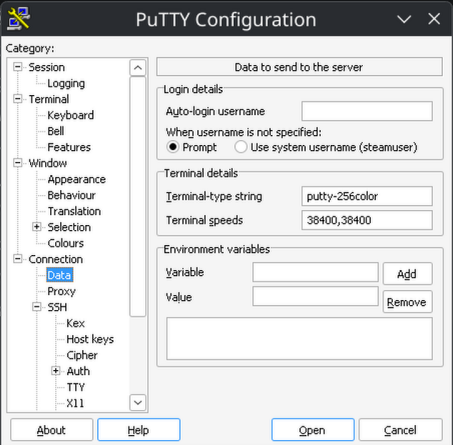
Sane TERM env var: Connection -> Data -> Terminal details -> Terminal-type string -> “putty-256color”
-
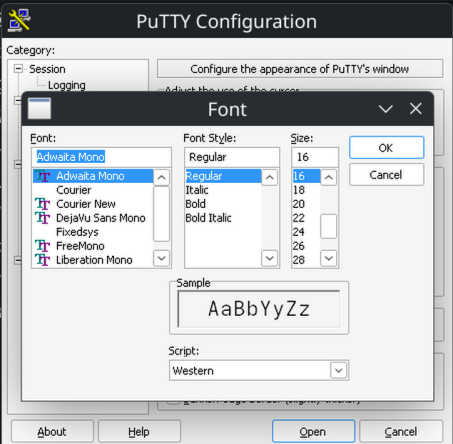
Sane default font: Window -> Appearance -> Font settings -> “Change” button -> adwaita mono 12
-
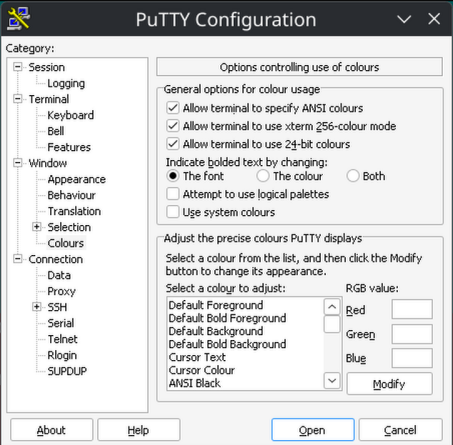
Sane bolding of text: Window -> Colors -> General options for color usage -> Indicate bolded text by changing: The font
-
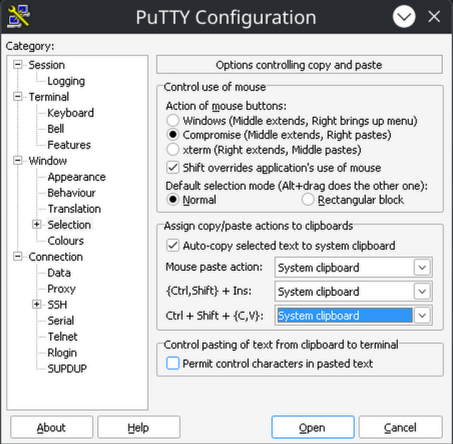
Sane (Linux-terminal-style) Ctrl + Shift + {C,V} (for copy and paste): Window -> Selection -> Assign copy/paste actions to clipboard -> Ctrl + Shift + (C,V}: System Clipboard